A story in seven parts
You have a personal newsletter.
You just never sent it to yourself.
Every bookmark on X was a small decision: this matters, save it, come back later. Most never get a “later.” Here’s why, and what happens when they finally do.
Part one · The graveyard
Your bookmarks folder isn't a list.
It's a sediment layer.
The newest bookmarks are still warm. You could probably tell me what two or three of them are. Scroll down a little and the certainty drops off fast. A month back, you're guessing. Six months back, you're reading captions you don't recognize, saved by a version of you having a different day.
Nothing was deleted. Nothing was lost, exactly. It's all still there, technically. It's just dirt now, pressed under everything you saved afterward, in a folder with no dates you can trust and no way back in except an endless thumb-scroll.
“X bookmarks are a goldmine of information, but 99% of the time, they get lost forever.”
Scott Larson · @IamScottlarson · Mar 2024↗a thread on debugging race conditions
2 days agoa tool someone swore would save you hours
1 week agoa book recommendation from a founder you follow
3 weeks agoa talk you meant to watch on the train
6 weeks agoa thread you saved "to read properly later"
2 months agosomething about pricing strategy, maybe?
4 months ago(you don't remember saving this one)
8 months agoIllustrative, but if the shape looks familiar, that's the point.
Part two · Built to disappear
This isn't a discipline problem.
It feels like a personal failing (“I really should go through my bookmarks sometime”), but the interface was never built to bring anything back to you. The bookmark button is a one-way door. It's designed to capture the impulse, not the follow-through.
No search that works
Try finding a bookmark from four months ago by a keyword you half-remember. X's bookmark search is new, shallow, and unreliable past a certain scroll depth.
No reminders
Nothing ever nudges you to come back. The folder doesn't email you, ping you, or resurface anything. It just waits, silently, forever.
No structure
One long list, reverse-chronological, no tags, no folders, no way to separate "read this tonight" from "reference forever."
No way out
No export. No digest. Whatever you save stays exactly where you put it, inside an app you open to scroll, not to review.
Part three · What you actually lost
Not the posts. What you meant to do with them.
The fix
The thread that explained the exact error you were staring at. Bookmarked in a hurry, buried by bedtime, needed again three months later when you hit it a second time.
The recommendation
Someone you follow mentioned a book that changed how they think about their work. You bookmarked it instead of writing down the title. You couldn't tell me the title now.
The tool
The exact tool that would've saved you two days last sprint went by in your feed. You bookmarked it instead of opening it. It's still bookmarked.
The opportunity
A job post, a course, a call for applications, saved in a rush, meant to revisit "tonight." Tonight didn't come, and neither did a reminder that it should have.
And that's the optimistic case. Tweets get deleted. Accounts get suspended or deactivated. Threads get quietly taken down. A bookmark points at a post, not a copy of it. If the post goes, so does everything you saved about it. A bookmark isn't a save. It's a hope that the internet doesn't change its mind.
Someone you followed
@handle
This post is no longer available.
Illustrative: this is what a vanished bookmark looks like.
“Oh and when you (accidentally) delete the bookmark it hides the tweet, good look [sic] finding it again”
Hbomberguy · @Hbomberguy · Jul 2023↗Part four · The reframe
Somewhere in that graveyard is the best newsletter you've never subscribed to, because you're the one who wrote it.
Every bookmark passed a filter no algorithm can replicate: it made you, specifically, stop scrolling. That's a higher signal than almost anything you pay to subscribe to. The only thing missing is a way for it to reach you again.
Even Andrej Karpathy built himself an AI system just to keep from losing track of everything he saves↗Part five · What if they came back to you
This is what bookmarks.md changes. Nothing more.
It resurfaces on its own
BeforeBuried under everything you saved after it, in a folder you don't open.
AfterArrives in your inbox every Monday, at an hour you pick, or every day, if you'd rather. Already read it? Skip it. Forgot it existed? Now you can't.
You can actually find it
BeforeX's bookmark search barely works past a few weeks back.
AfterFull-text search across everything you've ever saved: author, content, all of it, instantly.
You can ask it questions
BeforeYou never revisit anything, so whatever you learned just sits there.
AfterTalk to your bookmarks like a research assistant that only knows what you told it to remember: “What topics come up most in what I've saved?”
It survives even if X doesn't
BeforeDeleted tweet, suspended account, quietly removed thread. Gone for good.
AfterWe store the full text, author, and link the moment you save it. If X loses the original, you still have your copy.
Part six · Not a mockup
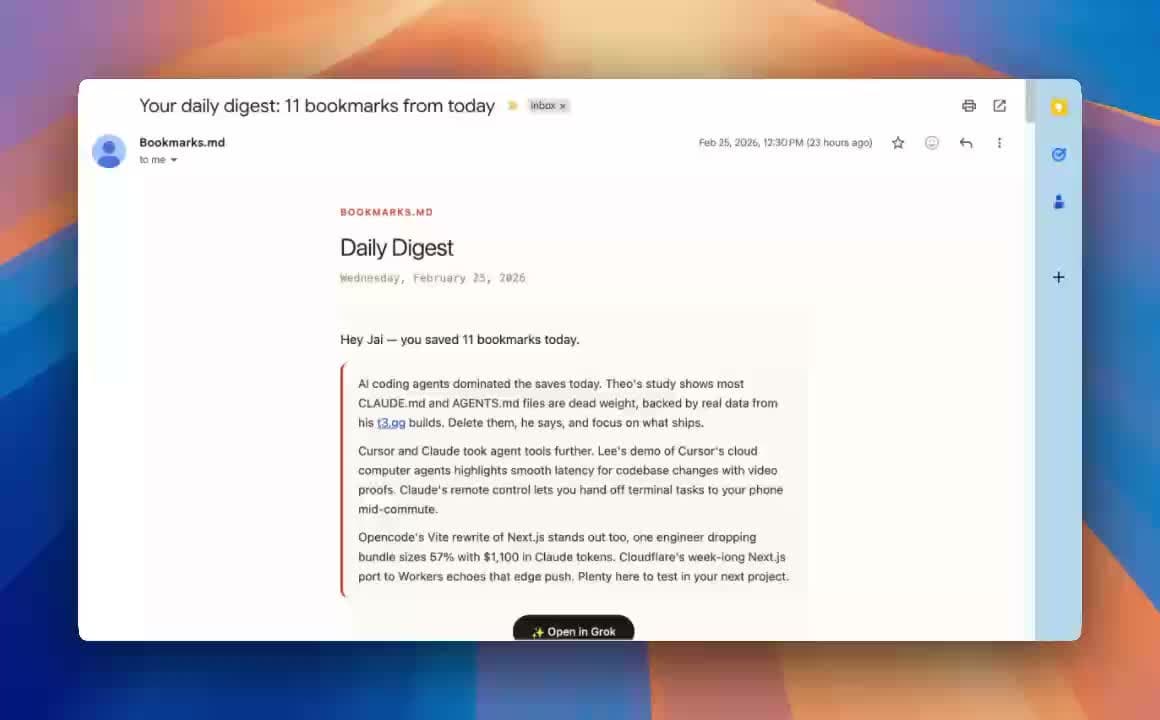
This is an actual digest, from an actual inbox.
No stock photos, no placeholder Latin. Every digest looks like this: your bookmarks, formatted, dated, and waiting.
Part seven · Monday morning
bookmarks.md
Your Monday digest: 11 new bookmarks
It's Monday. Coffee's still hot.
An email lands: eleven things you bookmarked this week, laid out and ready. Not a feed, not a pile, just eleven things.
The thread about the bug you hit twice. The tool someone swore by. The book. The talk you meant to watch on the train.
Ten minutes, and a week's worth of good intentions actually gets used, instead of buried under next week's.
Send yourself the newsletter
you already wrote.
Connect your X account and we'll start turning what you save into something you actually read. Setup takes under a minute.
Sign in with X→Public signup · Paid plans available